https://github.com/gotoeasy/gsbox
This is a cross-platform command-line tool for 3D Gaussian Splatting, supporting conversions like ply to splat, ply to spx, ply to spz, and vice versa. 一个关于 3d gaussian splating 的跨平台命令行小工具,ply 转 splat,ply 转 spx,ply 转 spz,或者 splat 转 ply,splat 转 spx 等命令行操作
https://github.com/gotoeasy/gsbox
3dgs ply ply2splat ply2spx ply2spz splat splat2ply splat2spx splat2spz spx spx2ply spx2splat spx2spz spz spz2ply spz2splat spz2spx
Last synced: 5 months ago
JSON representation
This is a cross-platform command-line tool for 3D Gaussian Splatting, supporting conversions like ply to splat, ply to spx, ply to spz, and vice versa. 一个关于 3d gaussian splating 的跨平台命令行小工具,ply 转 splat,ply 转 spx,ply 转 spz,或者 splat 转 ply,splat 转 spx 等命令行操作
- Host: GitHub
- URL: https://github.com/gotoeasy/gsbox
- Owner: gotoeasy
- License: gpl-3.0
- Created: 2024-05-06T03:21:49.000Z (over 1 year ago)
- Default Branch: main
- Last Pushed: 2025-05-22T00:43:13.000Z (7 months ago)
- Last Synced: 2025-06-02T04:16:22.138Z (7 months ago)
- Topics: 3dgs, ply, ply2splat, ply2spx, ply2spz, splat, splat2ply, splat2spx, splat2spz, spx, spx2ply, spx2splat, spx2spz, spz, spz2ply, spz2splat, spz2spx
- Language: Go
- Homepage:
- Size: 3.52 MB
- Stars: 54
- Watchers: 4
- Forks: 2
- Open Issues: 0
-
Metadata Files:
- Readme: README.md
- License: LICENSE
Awesome Lists containing this project
- awesome-3D-gaussian-splatting - gsbox Converter - PLY SPLAT SPZ SPX conversion tool (Tools & Utilities / Data Processing)
README
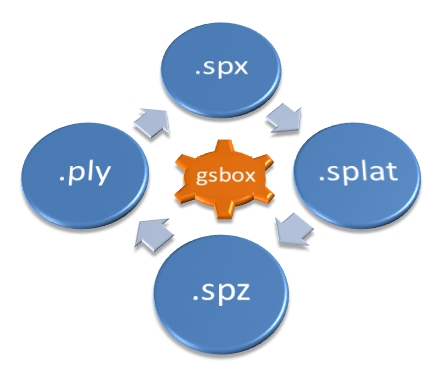
# gsbox
A cross-platform command-line tool for 3D Gaussian Splatting, focusing on format conversion and optimization.



## Features
- [x] Conversion between file formats, supporting `.ply`, `.splat`, `.spx`, and `.spz` formats for 3DGS.
- [x] Viewing file header information for `.ply`, `.spx`, and `.spz` files, or simple information of `.splat`.
- [x] Supports data transformation (Rotation, Scale, Translation).
- [x] Supports merging multiple model files into one.
## `.spz`
- The `.spz` format is an open 3DGS model format. Its encoding algorithm is highly commendable, and combined with gzip compression, it can significantly reduce the size of model files without any noticeable loss in visual quality.
- The official open-source repository for the `.spz` format is available at [spz](https://github.com/nianticlabs/spz). This format is about 10x smaller than the equivalent PLY format and is offered as open source by Niantic Labs. More details can be found at [scaniverse](https://scaniverse.com/spz)
- For rendering and viewing `.spz` format models, you can refer to [GaussianSplats3D](https://github.com/mkkellogg/GaussianSplats3D) or [Reall3dViewer](https://github.com/reall3d-com/Reall3dViewer)
## `.spx`
- The `.spx` format is flexible, expandable, and supports proprietary data protection. It incorporates encoding methods from both `.splat` and `.spz` formats and adds block compression processing. It supports progressive loading and is suitable for large file models.
- For detailed information about the `.spx` format, please refer to [SPX Specification](https://github.com/reall3d-com/Reall3dViewer/blob/main/SPX_EN.md)
- To render and view models in the `.spx` format, you can use [Reall3dViewer](https://github.com/reall3d-com/Reall3dViewer). This viewer is built on Three.js and supports features such as marking, measurements, and text watermarks.
## Usage
```shell
Usage:
gsbox [options]
Options:
p2s, ply2splat convert ply to splat
p2x, ply2spx convert ply to spx
p2z, ply2spz convert ply to spz
p2p, ply2ply convert ply to ply
s2p, splat2ply convert splat to ply
s2x, splat2spx convert splat to spx
s2z, splat2spz convert splat to spz
s2s, splat2splat convert splat to splat
x2p, spx2ply convert spx to ply
x2s, spx2splat convert spx to splat
x2z, spx2spz convert spx to spz
x2x, spx2spx convert spx to spx
z2p, spz2ply convert spz to ply
z2s, spz2splat convert spz to splat
z2x, spz2spx convert spz to spx
z2z, spz2spz convert spz to spz
join join the input model files into a single output file
info display the model file information
-i, --input specify the input file
-o, --output specify the output file
-c, --comment specify the comment for ply/spx output
-bs, --block-size specify the block size for spx output (default 20480)
-sh, --shDegree specify the SH degree for ply/spx/spz output
-f1, --flag1 specify the header flag1 for spx output
-f2, --flag2 specify the header flag2 for spx output
-f3, --flag3 specify the header flag3 for spx output
-rx, --rotateX specify the rotation angle in degrees about the x-axis for transform
-ry, --rotateY specify the rotation angle in degrees about the y-axis for transform
-rz, --rotateZ specify the rotation angle in degrees about the z-axis for transform
-s, --scale specify a uniform scaling factor(0.01~100.0) for transform
-tx, --translateX specify the translation value about the x-axis for transform
-ty, --translateY specify the translation value about the y-axis for transform
-tz, --translateZ specify the translation value about the z-axis for transform
-to, --transform-order specify the transform order (RST/RTS/SRT/STR/TRS/TSR), default is RST
-v, --version display version information
-h, --help display help information
Examples:
gsbox ply2splat -i /path/to/input.ply -o /path/to/output.splat
gsbox s2x -i /path/to/input.splat -o /path/to/output.spx -c "your comment" -bs 10240
gsbox x2z -i /path/to/input.spx -o /path/to/output.spz -sh 0 -rz 90 -s 0.9 -tx 0.1 -to TRS
gsbox z2p -i /path/to/input.spz -o /path/to/output.ply -c "your comment"
gsbox join -i a.ply -i b.splat -i c.spx -i d.spz -o output.spx
gsbox info -i /path/to/file.spx
# Convert the ply to spx without saving SH coefficients and add custom comments.
gsbox p2x -i /path/to/input.ply -o /path/to/output.spx -c "your comment here" -sh 0
# Inspect the header information of the spx file
gsbox info -i /path/to/file.spx
```
## Update History & binary files
https://github.com/gotoeasy/gsbox/releases