https://github.com/nemasisdarkx/rc-fire-engine
Fire Engine Based on ESP32
https://github.com/nemasisdarkx/rc-fire-engine
bot esp32 rc wifi
Last synced: 12 months ago
JSON representation
Fire Engine Based on ESP32
- Host: GitHub
- URL: https://github.com/nemasisdarkx/rc-fire-engine
- Owner: NemasisDarkX
- License: mit
- Created: 2024-01-06T17:30:52.000Z (over 2 years ago)
- Default Branch: main
- Last Pushed: 2024-02-04T05:46:08.000Z (over 2 years ago)
- Last Synced: 2025-04-07T16:54:13.399Z (about 1 year ago)
- Topics: bot, esp32, rc, wifi
- Language: C++
- Homepage:
- Size: 12 MB
- Stars: 0
- Watchers: 1
- Forks: 0
- Open Issues: 0
-
Metadata Files:
- Readme: README.md
- License: LICENSE
Awesome Lists containing this project
README
# R/C Fire Fighting Bot

## Overview
This project implements a remote-controlled fire-fighting robot using an ESP32 microcontroller. The robot can be controlled via a web interface, allowing users to maneuver the robot, adjust speed, control a servo, and activate a water pump.
## Features
- Remote control using a web interface
- Speed control for the motors
- Servo angle adjustment
- Water pump activation
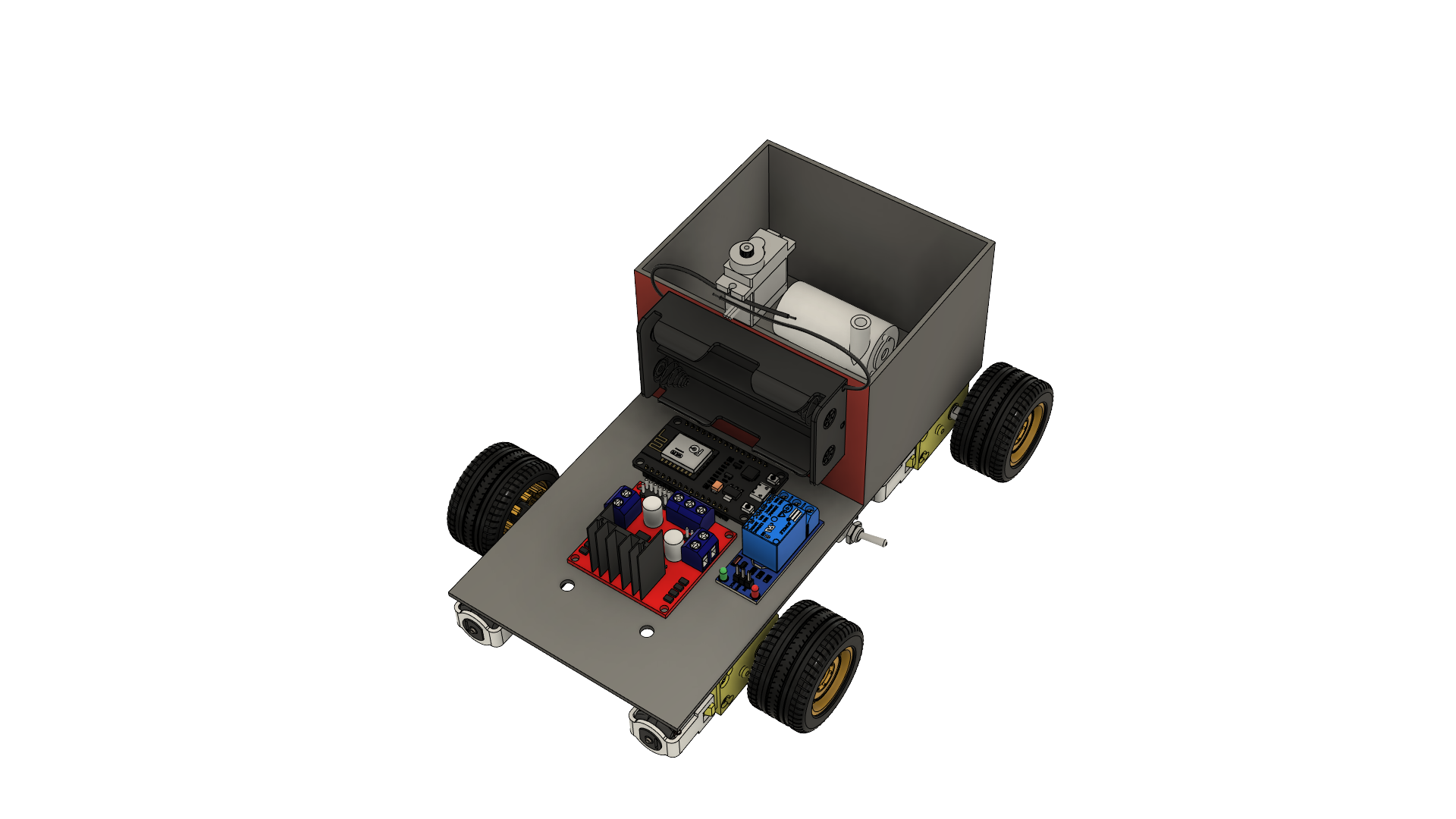
## Hardware Components
- ESP32 microcontroller
- DC Motors and Motor Drivers(L298N)
- Servo Motor
- Relay for Water Pump(Single Channel)
- Chassis(20cm x 10cm) and Wheels
- Power Supply(18650, 3.7v)
- Dot PCB
- Male/Female Pin Header
## Getting Started
### Prerequisites
- Arduino IDE: https://www.arduino.cc/en/software
- ESP32 Driver: Install from https://www.silabs.com/developers/usb-to-uart-bridge-vcp-drivers?tab=downloads
- [ESPAsyncWebServer Library](https://github.com/me-no-dev/ESPAsyncWebServer.git)
- Other libraries: install other libraries from the IDE's Librarys
### Installation
1. Clone the repository:
```bash
git clone https://github.com/NemasisDarkX/RC-Fire-Engine.git
```
2. Install the required libraries:
- [ESPAsyncWebServer](https://github.com/me-no-dev/ESPAsyncWebServer.git)
- Other libraries: ESP32Servo, Arduino_ESP32_OTA, ESPAsyncTCP, AsyncTCP, AsyncElegantOTA
Install the libraries using the Arduino Library Manager.
3. Open the Arduino IDE and load the project.
4. Upload the code to the ESP32.
### Usage
1. Connect your ESP32 to power.
2. Connect to the ESP32 Wi-Fi network (e.g., SSID: Fire Engine, Password: 12345678910).
3. Open a web browser and navigate to the ESP32's IP address (http://192.168.4.1).
4. Control the robot using the interactive web interface.
## Web Interface Controls
| Control | Description | Action |
|---------|-------------|--------|
| ⇧ | Move Forward | [Button](#) |
| ⇦ | Move Left | [Button](#) |
| ⇨ | Move Right | [Button](#) |
| ⇩ | Move Backward| [Button](#) |
| Speed | Adjust speed | [Slider](#) |
| Servo Angle | Adjust servo angle | [Slider](#) |
| Pump State | Control pump state | [Slider](#) |
- **Arrow Buttons**: Move the robot in different directions.
- **Speed Slider**: Adjust the speed of the motors.
- **Servo Angle Slider**: Control the angle of the servo.
- **Pump State Slider**: Activate or deactivate the water pump.
## Note!
You can either 3D print the chasis using the 3D model or like in my case use a laser cutter to cut it from a acrylic sheet.
You can use foarm board to make the water tank for the pump.
## Contributing
Feel free to contribute to this project by creating issues or pull requests.
## License
This project is licensed under the MIT License - see the [LICENSE](LICENSE) file for details.