https://github.com/nsevent/xbox-controller-mapper
Remap Xbox, PlayStation, Nintendo, and 300+ controllers to keyboard, mouse, macros, and scripts on macOS. Touchpad, gyroscope, swipe typing, and OBS integration.
https://github.com/nsevent/xbox-controller-mapper
accessibility controller-mapping couch-computing dualsense dualshock4 gamepad joy-con keyboard-mapper keyboard-shortcuts macos mouse-control nintendo-switch obs-websocket ps4-controller ps5-controller swift swiftui vibe-coding xbox-controller xbox-elite-wireless-controller-series-2
Last synced: 22 days ago
JSON representation
Remap Xbox, PlayStation, Nintendo, and 300+ controllers to keyboard, mouse, macros, and scripts on macOS. Touchpad, gyroscope, swipe typing, and OBS integration.
- Host: GitHub
- URL: https://github.com/nsevent/xbox-controller-mapper
- Owner: NSEvent
- License: other
- Created: 2025-12-29T05:47:30.000Z (6 months ago)
- Default Branch: main
- Last Pushed: 2026-06-07T04:43:51.000Z (29 days ago)
- Last Synced: 2026-06-07T06:11:33.876Z (29 days ago)
- Topics: accessibility, controller-mapping, couch-computing, dualsense, dualshock4, gamepad, joy-con, keyboard-mapper, keyboard-shortcuts, macos, mouse-control, nintendo-switch, obs-websocket, ps4-controller, ps5-controller, swift, swiftui, vibe-coding, xbox-controller, xbox-elite-wireless-controller-series-2
- Language: Swift
- Homepage: https://kevintang.xyz/apps/controller-keys/
- Size: 47.9 MB
- Stars: 54
- Watchers: 1
- Forks: 9
- Open Issues: 2
-
Metadata Files:
- Readme: README.md
- Changelog: CHANGELOG.md
- Contributing: CONTRIBUTING.md
- Funding: .github/FUNDING.yml
- License: LICENSE
- Code of conduct: CODE_OF_CONDUCT.md
- Security: SECURITY.md
- Support: SUPPORT.md
- Agents: .github/AGENTS.md
Awesome Lists containing this project
README
[English](README.md) | [简体中文](README.zh-Hans.md) | [Deutsch](README.de.md) | [日本語](README.ja.md)
# ControllerKeys — Gamepad-to-Keyboard Remapper for macOS
A native macOS app that remaps game controllers to keyboard shortcuts, mouse input, macros, scripts, webhooks, and system commands — turning any gamepad into a full desktop input device. Supports Xbox Series X|S, Xbox Elite Series 2, PS5 DualSense, PS4 DualShock 4, Nintendo Joy-Con, Switch Pro Controller, Steam Controller, the Apple TV Siri Remote, the keychain-sized 8BitDo Zero 2 and Micro, and 300+ third-party gamepads. Features DualSense and Steam Controller touchpad and gyroscope mouse control, swipe typing, a JavaScript scripting engine, per-app profile auto-switching, a realtime low-latency input mode, and Mac-to-Mac controller handoff over Wi-Fi.
**[Website & Documentation](https://www.kevintang.xyz/apps/controller-keys)** | **[Download](https://thekevintang.gumroad.com/l/xbox-controller-mapper)** | **[Discord Community](https://discord.gg/WsZJkRsPPg)**


### Use Cases
- **Vibe coding from the couch** — map shortcuts, run macros, and pair with voice transcription (e.g., VoiceInk) for full hands-free coding
- **Couch computing & media browsing** — navigate macOS, switch apps, scroll, and type from across the room
- **Accessibility** — alternative input for users who can't use a keyboard/mouse; works with macOS Accessibility Zoom
- **Streaming & content creation** — trigger OBS scenes, mute/unmute, fire webhooks, and show button overlays on stream
- **Presentations** — laser pointer overlay, app switching, and clicker-style navigation with any gamepad
## Why This App?
There are other controller mapping apps for macOS, but none offered everything I needed:
| Feature | ControllerKeys | Joystick Mapper | Enjoyable | Controlly |
|---------|:--------------:|:---------------:|:---------:|:---------:|
| DualSense touchpad + quadrant mapping | ✅ | ❌ | ❌ | ❌ |
| Steam Controller (no Steam required) | ✅ | ❌ | ❌ | ❌ |
| Multi-touch gestures (tap, pinch, pan) | ✅ | ❌ | ❌ | ❌ |
| Gyroscope aiming & gesture detection | ✅ | ❌ | ❌ | ❌ |
| JavaScript scripting engine | ✅ | ❌ | ❌ | ❌ |
| Swipe typing on-screen keyboard | ✅ | ❌ | ❌ | ❌ |
| Chord mappings (button combos) | ✅ | ❌ | ❌ | ✅ |
| Button sequence combos | ✅ | ❌ | ❌ | ❌ |
| Layers (alternate mapping sets) | ✅ | ❌ | ❌ | ❌ |
| Per-layer stick mode override | ✅ | ❌ | ❌ | ❌ |
| Custom stick direction bindings (WASD, arrows, anything) | ✅ | ❌ | ❌ | ❌ |
| Per-mapping haptic feedback | ✅ | ❌ | ❌ | ❌ |
| Macros & system commands | ✅ | ❌ | ❌ | ❌ |
| HTTP webhooks & OBS control | ✅ | ❌ | ❌ | ❌ |
| Realtime low-latency key mode | ✅ | ❌ | ❌ | ❌ |
| Mac-to-Mac controller handoff (Universal Control-style) | ✅ | ❌ | ❌ | ❌ |
| Linked controllers (auto-switch profile per controller) | ✅ | ❌ | ❌ | ❌ |
| Profile snapshots & undo (History tab) | ✅ | ❌ | ❌ | ❌ |
| On-screen keyboard & command wheel | ✅ | ❌ | ❌ | ❌ |
| Community profiles with setup guides | ✅ | ❌ | ❌ | ❌ |
| App-specific profile auto-switching | ✅ | ❌ | ❌ | ❌ |
| Stream overlay for OBS | ✅ | ❌ | ❌ | ❌ |
| Xbox Elite Series 2 paddles | ✅ | ❌ | ❌ | ❌ |
| Nintendo Joy-Con & Pro Controller | ✅ | ❌ | ❌ | ❌ |
| Apple TV Siri Remote as a controller | ✅ | ❌ | ❌ | ❌ |
| DualSense Edge (Pro) support | ✅ | ❌ | ❌ | ❌ |
| DualShock 4 (PS4) touchpad & gyro | ✅ | ❌ | ❌ | ❌ |
| DualSense LED & microphone control | ✅ | ❌ | ❌ | ❌ |
| Drag-and-drop mapping swap | ✅ | ❌ | ❌ | ❌ |
| Usage stats & Controller Wrapped | ✅ | ❌ | ❌ | ❌ |
| Localized (EN / 简中 / 繁中 / DE / JA) | ✅ | ❌ | ❌ | ❌ |
| Third-party controllers (~313) | ✅ | ✅ | ✅ | ✅ |
| Native Apple Silicon | ✅ | ❌ | ❌ | ✅ |
| Actively maintained (2026) | ✅ | ❌ | ❌ | ✅ |
| Open source | ✅ | ❌ | ✅ | ❌ |
**Joystick Mapper** hasn't been updated since November 2019 and lacks modern controller support. **Enjoyable** is abandoned since 2014. **Controlly** is solid but doesn't support touchpad gestures, on-screen keyboard, or scripting. **Steam's controller mapping** only works within Steam games, not system-wide.
## Features
- **Button Mapping**: Map any controller button to keyboard shortcuts
- Modifier-only mappings (⌘, ⌥, ⇧, ⌃)
- Key-only mappings
- Modifier + Key combinations
- Long-hold for alternate actions
- Double-tap for additional actions
- Simulate key repeat while held (for games that need repeated key-down events)
- Chording (multiple buttons → single action)
- Button sequences (ordered combos, e.g., Up-Up-Down-Down)
- Per-mapping haptic feedback
- Custom hints to label your mappings
- Drag-and-drop to swap mappings between buttons
- Hover connector lines between buttons and their actions
- **Layers**: Create alternate button mapping sets activated by holding a designated button
- Up to 3 layers total (base + 2 additional)
- Momentary activation while holding the activator button
- Fallthrough behavior for unmapped buttons
- Name your layers (e.g., "Combat Mode", "Navigation")
- Per-layer lightbar color on DualSense/DualShock 4 (auto-assigned from a 12-color palette)
- **Per-layer stick mode override**: each layer can independently set either stick to Mouse / Scroll / WASD / Custom — release the activator and the base mode resumes
- **Layer-aware controller minimap**: a `BASE` / `LAYER ` chip plus outlines in the layer's color show exactly which buttons, sticks, shoulders, D-pad directions, and touchpad regions the current layer overrides
- **Custom Stick Direction Mappings**: Set either stick's mode to **Custom** and each of its 8 directions (4 cardinal + 4 diagonals) becomes a real button you can bind from the controller graphic
- One-click presets for WASD or Arrow Keys
- Diagonal movement is properly held (e.g., W+D for forward-right in Factorio)
- Stick directions support long-hold, double-tap, chords, and sequences just like physical buttons
- **Realtime Input Latency Mode**: Per-profile Input setting that sends simple key mappings as key-down on press and key-up on release, bypassing the chord-detection window for lower latency
- Double-tap, long-hold, repeat, and chord mappings stay on the standard timing path so advanced interactions keep their existing behavior
- **Universal Control-style Mac-to-Mac Relay**: Pair two ControllerKeys-running Macs and push your controller's cursor against a configured screen edge to hand off mouse, keyboard, and *mapped actions* to the second Mac
- The receiving Mac runs the actions against its own active profile, so a chord that opens Finder on the host opens Finder on the remote
- Local-network only (private/link-local IPv4/IPv6, Tailscale `100.64.0.0/10`, localhost)
- HMAC-SHA256 authenticated frames with a Keychain-stored shared secret; oversized, replayed, or tampered frames are dropped
- Swipe typing, on-screen overlays, and stuck-button cleanup all relay through the same channel
- **Linked Controllers**: Bind a profile to a specific physical controller so it auto-activates whenever that controller connects (Linked Apps still win when the frontmost app has its own profile)
- **JavaScript Scripting**: Write custom automation scripts powered by JavaScriptCore
- Full API: `press()`, `hold()`, `click()`, `type()`, `paste()`, `delay()`, `shell()`, `openURL()`, `openApp()`, `notify()`, `haptic()`, and more
- App-aware scripting with `app.name`, `app.bundleId`, `app.is()` for context-sensitive actions
- Trigger context (`trigger.button`, `trigger.pressType`, `trigger.holdDuration`)
- `screenshotWindow()` API for capturing the focused window
- Per-script persistent state that survives across invocations
- Built-in example gallery with ready-to-use scripts
- Script editor with syntax reference and AI prompt assistant
- **Macros**: Multi-step action sequences
- Key Press, Type Text, Delay, Paste, Shell Command, Webhook, and OBS steps
- Configurable typing speed
- Assignable to buttons, chords, long-hold, and double-tap
- **System Commands**: Automate actions beyond key presses
- Launch App: Open any application
- Shell Command: Run terminal commands silently or in a terminal window
- Open Link: Open URLs in your default browser
- **HTTP Webhooks**: Send HTTP requests from controller buttons and chords
- Supports GET, POST, PUT, DELETE, and PATCH methods
- Configurable headers and request body
- Response handling with configurable retry (exponential backoff), timeout, and follow-up shell commands
- Visual feedback showing response status above cursor
- Haptic feedback on success or failure
- **OBS WebSocket Commands**: Control OBS Studio directly from controller buttons
- **Joystick Control**:
- Left joystick → Mouse movement (or WASD keys)
- Right joystick → Scrolling (or Arrow keys)
- Configurable sensitivity and deadzone
- Hold modifier (RT by default) for precise mouse movement with cursor highlight
- Disable option to turn off stick input entirely
- **Gyroscope Aiming & Gestures** (DualSense/DualShock 4):
- Gyro aiming: Use the gyroscope for precise mouse control in focus mode
- 1-Euro filter for jitter-free smoothing with responsive tracking
- Gesture mappings: Tilt forward/back and steer left/right to trigger actions
- Per-profile gesture sensitivity and cooldown sliders
- DualShock 4 gyro parsed from raw HID reports with auto-calibration
- **Touchpad Control** (DualSense/DualShock 4/Steam Controller):
- Single-finger tap or click → Left click
- Two-finger tap or click → Right click
- Two finger swipe → Scrolling
- Two finger pinch → Zoom in/out
- **Quadrant remapping**: Split the touchpad into 4 regions with separate touch and click actions
- Per-pad scroll inversion settings for DualSense and Steam pads
- **On-Screen Keyboard, Commands, and Apps**: Use the on-screen keyboard widget to quickly select apps, commands, or keyboard keys
- Swipe typing: Slide across letters to type words (SHARK2 algorithm)
- D-pad navigation with floating highlight
- Easily enter configurable text strings and commands in Terminal with a single click
- Use built-in variables to customize text output
- Show and hide apps in customizable app bar
- Website links with favicons
- Media key controls (playback, volume, brightness)
- Global keyboard shortcut to toggle visibility
- Auto-scaling to fit smaller displays
- **Command Wheel**: GTA 5-inspired radial menu for quick app/website switching
- Navigate with right stick, release to activate
- Haptic feedback during navigation
- Modifier key to toggle between apps and websites
- Force quit and new window actions at full stick deflection
- **Stream Overlay for OBS**: Floating overlay showing active button presses for stream capture
- **Laser Pointer Overlay**: On-screen pointer for presentations
- **Directory Navigator**: Controller-driven file browser overlay
- Right stick navigation, B to confirm, Y to dismiss
- Mouse support and position memory
- **Cursor Hints**: Visual feedback showing executed actions above the cursor
- Shows action name or macro name when buttons are pressed
- Badges for double-tap (2×), long-press (⏱), and chord (⌘) actions
- Held modifier feedback with purple "hold" badge
- **Controller Wrapped**: Usage stats with shareable personality-typed cards
- Track every button press, macro, webhook, app launch, and more
- Streak tracking and personality typing based on usage patterns
- Copy shareable card to clipboard for social media
- **Profile System**: Create and switch between multiple mapping profiles
- Community profiles: Browse and import pre-made profiles, with optional markdown **setup guides** that render inline above the mappings list (copy buttons on every code block)
- App-specific auto-switching: Link profiles to applications
- Linked-controller auto-switching: Bind a profile to a physical controller so it activates on connect
- Stream Deck V2 profile import
- Custom profile icons
- **Profile sidebar status indicators**: Linked-Apps glyphs and compact badges for realtime mode, linked controllers, custom icons, and the default profile
- **History & Snapshots**: ControllerKeys silently snapshots your full configuration before every destructive operation (delete profile, import profile, restore snapshot) and exposes them in a dedicated **History** tab
- Restore any snapshot — the restore itself is snapshotted first, so undo is itself undoable
- Snapshots live at `~/.config/controllerkeys/snapshots/` (capped at 20)
- **Profile-Import Safety Prompts**: Imports that contain shell commands, scripts, or webhook follow-up commands open an explicit consent sheet listing every code-execution surface verbatim — no silent execution from third-party profiles
- **Visual Interface**: Interactive controller-shaped UI for easy configuration
- Auto-scaling UI based on window size
- Button mapping swap to quickly exchange mappings between two buttons
- VoiceOver accessibility support
- **Grouped tab navigation**: tabs organized into **Map / Automate / Hardware / Activity** with SF Symbol icons; the input log is a compact "Timeline" strip
- **Configurable section visibility**: hide the input log, mapped chords/sequences/gestures lists, or touchpad regions section from the Buttons tab
- **Window background opacity slider** (Settings → Appearance) to tune liquid-glass tint over the desktop
- Localized in English, Simplified Chinese, Traditional Chinese, German, and Japanese
- **DualSense Support**: Full PlayStation 5 DualSense controller support
- Full touchpad support with multi-touch gestures and quadrant remapping
- Gyroscope aiming and gesture detection
- Customizable LED colors over USB and Bluetooth
- Per-layer lightbar colors
- DualSense built-in microphone support in USB connection mode
- Microphone mute button mapping
- Battery notifications at low (20%), critical (10%), and fully charged (100%)
- Battery-level lightbar with charging animation
- **DualSense Edge (Pro) Support**: Full support for Edge-specific controls
- Function buttons and paddles
- Edge buttons available as layer activators
- **DualShock 4 (PS4) Support**: Full PlayStation 4 DualShock 4 support
- Touchpad mouse control and gestures (same as DualSense)
- Lightbar color control over USB and Bluetooth
- Gyroscope aiming and gesture detection (parsed from raw HID reports)
- PlayStation-style button labels and icons throughout the UI
- PS button support via HID monitoring (USB and Bluetooth)
- **Xbox Elite Series 2 Support**: Full support for Elite-specific hardware
- All 4 back paddles (P1–P4) detected and mappable
- Guide button works over Bluetooth via IOKit HID
- Correct controller name and UI regardless of firmware version
- Works with both Classic BT and BLE firmware variants
- **Steam Controller Support**: Detected over raw HID **without requiring Steam to run**
- All buttons, sticks, triggers, grip buttons, and battery reports parsed directly
- Both square touchpads work in **Whole Pad** or **Quadrants** mode, with two-pad pinch-to-zoom and per-region click/touch bindings
- Gyro aiming and gyro gesture mappings using the Steam Controller's raw gyro scale
- Touchpad haptics, dedicated Steam-Controller preview layout, and Steam-logo button icons throughout the UI
- The duplicate macOS GameController route is suppressed so inputs aren't double-processed and stray default commands don't fire alongside your mappings
- **Nintendo Controller Support**: Joy-Con and Pro Controller
- Single Joy-Con, paired Joy-Cons (L+R), and Pro Controller
- Correct Nintendo button labels (L/R, ZL/ZR, +/−, Capture, Home)
- Single Joy-Con input via physical input profile enumeration
- **Apple TV Siri Remote Support**: Pair the 2nd-generation Siri Remote to your Mac over Bluetooth and use it as a controller
- Clickpad reports both touch (cursor) and physical click; D-pad ring maps to the four cardinal directions
- Side controls — TV/Home, Back, Play/Pause, Siri, Power, Mute, volume rocker — all individually mappable with Apple-Remote labels
- **Edge Scroll**: drag a finger around the outer clickpad ring for iPod-wheel-style scrolling, with configurable speed
- Dedicated tall remote preview in the UI; runs entirely over raw IOKit HID — no Apple TV required
- **8BitDo Zero 2 & Micro Support**: First-class support for the keychain-sized 8BitDo pads, with on-screen layouts built just for them
- A pixel-accurate on-screen map of each pad, with hardware-accurate labels (L/R bumpers, plus L2/R2 triggers on the Micro)
- The d-pad just works: these tiny pads feed their d-pad through an analog axis that macOS mis-reads (right often registers as left), so ControllerKeys reads the raw reports and corrects it on every reconnect
- Turn the d-pad into **Arrow Keys, WASD, custom keys, the Mouse, or Scroll** — so the pad can type, click, or move the cursor
- The Micro's Home button — which macOS normally swallows — is recovered and shown with the 8BitDo logo; the firmware profile (star) button stays as a non-mappable hint
- It all works the moment you pair, and a clone-detection check keeps your other controllers unaffected
- **Third-Party Controller Support**: ~313 controllers supported via SDL database
- 8BitDo, Logitech, PowerA, Hori, and more
- No manual configuration needed
- **Accessibility Zoom Support**: Controller input works correctly when macOS Accessibility Zoom is active
- Cursor, clicks, and scroll positions properly scaled to zoomed coordinates
- **Controller Lock Toggle**: Lock/unlock all controller input with haptic feedback
- Lightbar turns red and menu bar icon shows lock indicator while locked
- **Hide Dock Icon**: Option to run as a menu-bar-only app
More Screenshots
### On-Screen Keyboard with Swipe Typing

### JavaScript Scripting

### Macros

### Chord Mappings

### DualSense Touchpad

### DualSense LED Customization

### Keyboard Widget Settings

### 8BitDo Zero 2 & Micro (custom on-screen layouts)


## Supported Controllers
| Brand | Controllers |
|-------|------------|
| **Xbox** | Series X\|S, Xbox One, Xbox 360, Xbox Elite Series 2 (with paddles) |
| **PlayStation** | DualSense (PS5), DualSense Edge, DualShock 4 v1/v2 (PS4) |
| **Nintendo** | Switch Pro Controller, Joy-Con (single or paired L+R) |
| **Valve** | Steam Controller (touchpads, gyro, grips, haptics — no Steam required) |
| **Apple** | Siri Remote / Apple TV Remote 2nd gen (clickpad cursor, edge scroll, mappable side buttons) |
| **8BitDo** | **Zero 2 & Micro** (dedicated on-screen layouts + corrected d-pad), Pro 2, SN30 Pro, SN30 Pro+, Ultimate, Lite, and more |
| **Logitech** | F310, F510, F710 |
| **PowerA** | Enhanced Wired, Fusion Pro |
| **Hori** | HORIPAD, Fighting Commander, and more |
| **Others** | ~313 controllers total via [SDL gamecontrollerdb](https://github.com/gabomdq/SDL_GameControllerDB) |
Any controller recognized by macOS's GameController framework works out of the box. Unrecognized controllers fall back to the SDL database for automatic button mapping.
## Requirements
- macOS 14.6 or later
- A supported controller (see above) connected via Bluetooth or USB
- Accessibility permissions (for input simulation)
- Automation permissions (for launching Terminal app with commands)
## Installation
**[Download ControllerKeys](https://thekevintang.gumroad.com/l/xbox-controller-mapper)** - Get the latest signed and notarized build.
Want a tour first? The [website](https://www.kevintang.xyz/apps/controller-keys) has demo videos, the full feature breakdown, and an FAQ.
1. Purchase and download the DMG from Gumroad
2. Open the DMG and drag the app to `/Applications`
3. Launch and grant Accessibility permissions when prompted
4. Automation permissions will be requested when using terminal commands from the on-screen keyboard
The app is signed with an Apple Developer ID certificate and notarized by Apple, so it will run without Gatekeeper warnings.
## Trust & Transparency
This app requires **Accessibility permissions** to simulate keyboard and mouse input. We understand this is a sensitive permission, which is why this project is fully open source.
**Why this app is safe:**
- **Open Source**: The complete source code is available for audit. You can verify exactly what the app does with your input data.
- **No Telemetry or Phoning Home**: The app never contacts any server on its own. Network access only occurs when you explicitly configure webhooks, OBS WebSocket commands, or community profile imports.
- **No Data Collection**: The app does not log, store, or transmit any input data. Controller inputs are translated to keyboard/mouse events in real-time and immediately discarded.
- **Signed & Notarized**: Releases are signed with an Apple Developer ID certificate and notarized by Apple, ensuring the binary matches the source code and hasn't been tampered with.
**What the Accessibility permission is used for:**
- Simulating keyboard key presses (when you press controller buttons)
- Simulating mouse movement (when you move the left joystick)
- Simulating scroll wheel events (when you move the right joystick)
The app uses Apple's `CGEvent` API to generate these input events. This is the same API used by accessibility tools, automation software, and other input remapping utilities.
## Architecture
Architecture overview — useful for security review and contributors. The complete source is open for transparency; please support the project by [purchasing on Gumroad](https://thekevintang.gumroad.com/l/xbox-controller-mapper).
```mermaid
flowchart LR
subgraph group_app["macOS app"]
node_app_entry["App entry
SwiftUI app"]
node_main_window["Main window
SwiftUI shell
[ContentView.swift]"]
node_menu_bar["Menu bar
popover UI
[MenuBarView.swift]"]
node_controller_service["Controller service
input boundary"]
node_hid_parsing["HID parsing
controller IO"]
node_motion_touch["Motion & touch
controller adapters"]
node_mapping_engine["Mapping engine
decision core"]
node_gesture_seq["Gestures & chords
input semantics"]
node_action_exec["Action executor
output boundary"]
node_input_sim["Input simulator
accessibility output"]
node_profile_manager["Profile manager
config lifecycle"]
node_profile_load["Profile load
config pipeline"]
node_app_monitor["App monitor
context service
[AppMonitor.swift]"]
node_ui_services["UI services
overlay utilities"]
node_macro_script["Macros & scripts
[MacroExecutor.swift]"]
node_integration["Integrations
OBS · webhooks"]
node_security["Security guards
safety boundary"]
node_swipe_runtime["Swipe typing
runtime model"]
end
subgraph group_pipeline["ML pipeline"]
node_swipe_pipeline["Swipe training
ML pipeline
[train.py]"]
end
node_community_profiles["Community profiles
profile library"]
node_app_entry -->|"launches"| node_main_window
node_app_entry -->|"shows"| node_menu_bar
node_main_window -->|"observes"| node_controller_service
node_main_window -->|"edits"| node_profile_manager
node_main_window -->|"drives"| node_ui_services
node_menu_bar -->|"uses"| node_app_monitor
node_controller_service -->|"parses"| node_hid_parsing
node_controller_service -->|"adapts"| node_motion_touch
node_controller_service -->|"feeds"| node_mapping_engine
node_hid_parsing -->|"normalizes"| node_mapping_engine
node_motion_touch -->|"specializes"| node_gesture_seq
node_mapping_engine -->|"resolves"| node_gesture_seq
node_mapping_engine -->|"emits"| node_action_exec
node_profile_manager -->|"loads"| node_profile_load
node_profile_manager -->|"configures"| node_mapping_engine
node_profile_manager -->|"imports"| node_community_profiles
node_app_monitor -->|"switches"| node_profile_manager
node_action_exec -->|"synthesizes"| node_input_sim
node_action_exec -->|"invokes"| node_macro_script
node_action_exec -->|"controls"| node_integration
node_action_exec -->|"updates"| node_ui_services
node_macro_script -->|"consults"| node_security
node_security -->|"guards"| node_integration
node_security -->|"audits"| node_profile_load
node_swipe_pipeline -->|"exports"| node_swipe_runtime
node_swipe_runtime -->|"feeds"| node_action_exec
click node_app_entry "https://github.com/NSEvent/xbox-controller-mapper/blob/main/XboxControllerMapper/XboxControllerMapper/XboxControllerMapperApp.swift"
click node_main_window "https://github.com/NSEvent/xbox-controller-mapper/blob/main/XboxControllerMapper/XboxControllerMapper/Views/MainWindow/ContentView.swift"
click node_menu_bar "https://github.com/NSEvent/xbox-controller-mapper/blob/main/XboxControllerMapper/XboxControllerMapper/Views/MenuBar/MenuBarView.swift"
click node_controller_service "https://github.com/NSEvent/xbox-controller-mapper/blob/main/XboxControllerMapper/XboxControllerMapper/Services/Controller/ControllerService.swift"
click node_hid_parsing "https://github.com/NSEvent/xbox-controller-mapper/blob/main/XboxControllerMapper/XboxControllerMapper/Services/Controller/HIDReportParser.swift"
click node_motion_touch "https://github.com/NSEvent/xbox-controller-mapper/blob/main/XboxControllerMapper/XboxControllerMapper/Services/Controller/ControllerService+Touchpad.swift"
click node_mapping_engine "https://github.com/NSEvent/xbox-controller-mapper/blob/main/XboxControllerMapper/XboxControllerMapper/Services/Mapping/MappingEngine.swift"
click node_gesture_seq "https://github.com/NSEvent/xbox-controller-mapper/blob/main/XboxControllerMapper/XboxControllerMapper/Services/Mapping/GestureDetector.swift"
click node_action_exec "https://github.com/NSEvent/xbox-controller-mapper/blob/main/XboxControllerMapper/XboxControllerMapper/Services/Mapping/MappingActionExecutor.swift"
click node_input_sim "https://github.com/NSEvent/xbox-controller-mapper/blob/main/XboxControllerMapper/XboxControllerMapper/Services/Input/InputSimulator.swift"
click node_profile_manager "https://github.com/NSEvent/xbox-controller-mapper/blob/main/XboxControllerMapper/XboxControllerMapper/Services/Profile/ProfileManager.swift"
click node_profile_load "https://github.com/NSEvent/xbox-controller-mapper/blob/main/XboxControllerMapper/XboxControllerMapper/Services/Profile/ProfileConfigurationLoadCoordinator.swift"
click node_app_monitor "https://github.com/NSEvent/xbox-controller-mapper/blob/main/XboxControllerMapper/XboxControllerMapper/Services/UI/AppMonitor.swift"
click node_ui_services "https://github.com/NSEvent/xbox-controller-mapper/blob/main/XboxControllerMapper/XboxControllerMapper/Services/UI/CommandWheelManager.swift"
click node_macro_script "https://github.com/NSEvent/xbox-controller-mapper/blob/main/XboxControllerMapper/XboxControllerMapper/Services/Macros/MacroExecutor.swift"
click node_integration "https://github.com/NSEvent/xbox-controller-mapper/blob/main/XboxControllerMapper/XboxControllerMapper/Services/Integration/OBSWebSocketClient.swift"
click node_security "https://github.com/NSEvent/xbox-controller-mapper/blob/main/XboxControllerMapper/XboxControllerMapper/Services/Input/UniversalControlRelaySecurity.swift"
click node_swipe_runtime "https://github.com/NSEvent/xbox-controller-mapper/blob/main/XboxControllerMapper/XboxControllerMapper/Services/Input/SwipeTypingEngine.swift"
click node_swipe_pipeline "https://github.com/NSEvent/xbox-controller-mapper/blob/main/SwipeModel/train.py"
click node_community_profiles "https://github.com/NSEvent/xbox-controller-mapper/blob/main/community-profiles/OBS%20Live%20Streaming.json"
classDef toneLavender fill:#ede9fe,stroke:#7c3aed,stroke-width:1.5px,color:#2e1065
classDef toneBlue fill:#bfdbfe,stroke:#2563eb,stroke-width:1.5px,color:#172554
classDef toneTeal fill:#99f6e4,stroke:#0f766e,stroke-width:1.5px,color:#134e4a
classDef toneIndigo fill:#c7d2fe,stroke:#4f46e5,stroke-width:1.5px,color:#312e81
classDef toneNeutral fill:#f1f5f9,stroke:#94a3b8,stroke-width:1.5px,color:#334155
classDef toneRose fill:#ffe4e6,stroke:#e11d48,stroke-width:1.5px,color:#881337
classDef toneAmber fill:#fef3c7,stroke:#d97706,stroke-width:1.5px,color:#78350f
class node_app_entry,node_main_window,node_menu_bar toneLavender
class node_controller_service,node_hid_parsing,node_motion_touch toneBlue
class node_profile_manager,node_profile_load,node_app_monitor,node_community_profiles toneTeal
class node_mapping_engine,node_gesture_seq,node_action_exec toneIndigo
class node_input_sim,node_ui_services,node_macro_script,node_integration,node_swipe_runtime toneNeutral
class node_security toneRose
class node_swipe_pipeline toneAmber
```
For a deeper technical walkthrough of each component — service responsibilities, threading model, the SDL HID fallback, performance profile — see [ARCHITECTURE.md](ARCHITECTURE.md).
## Project Structure
```
XboxControllerMapper/XboxControllerMapper/
├── XboxControllerMapperApp.swift # App entry point & service container
├── Config.swift # Constants & UserDefaults keys
├── Models/ # Profiles, mappings, chords, sequences, gestures, LED settings
├── Services/
│ ├── Controller/ # GameController + raw HID input (PlayStation, Steam, Apple TV Remote, Elite, SDL fallback)
│ ├── Mapping/ # Mapping engine, chord/sequence/gesture detection, action execution
│ ├── Input/ # CGEvent input simulation, swipe typing, Mac-to-Mac relay
│ ├── Profile/ # Config persistence, snapshots, community profile import
│ ├── Scripting/ # JavaScriptCore script engine
│ ├── Macros/ # Macro execution
│ ├── Integration/ # OBS WebSocket, webhooks
│ └── UI/ # Overlays: command wheel, on-screen keyboard, cursor hints, stream overlay
├── Views/
│ ├── MainWindow/ # Main window tabs & mapping sheets
│ ├── MenuBar/ # Menu bar popover
│ └── Components/ # Shared SwiftUI components
└── Resources/ # SDL controller database, swipe-typing model
```
See [ARCHITECTURE.md](ARCHITECTURE.md) for service responsibilities, the input pipeline, and the threading model.
## Default Mappings
| Button | Default Action |
|--------|---------------|
| A | Left mouse click (hold to drag) |
| B | Return — long-hold: ⌘Return |
| X | Delete (repeats while held) |
| Y | Escape |
| LB | ⌥ (hold) |
| RB | ⌃ (hold) |
| LT | F13 |
| RT | ⌘ (hold) |
| D-pad | Arrow keys (repeat while held) |
| Menu | ⌘V — double-tap: ⇧⌘V, long-hold: ⌘L |
| View | ⌘C — double-tap: ⌘A |
| Xbox | Space |
| Share | ⌘⌥ (hold) |
| L-Stick Click | ⌥A — long-hold: ⌘Tab |
| R-Stick Click | ⌃C — double-tap: ⌘W |
| Left Joystick | Mouse movement |
| Right Joystick | Scroll |
## Usage
1. Connect your controller via Bluetooth or USB (System Settings → Bluetooth)
2. Launch ControllerKeys
3. Grant Accessibility permissions when prompted
4. Click any button on the controller visualization to configure its mapping
5. Use the menu bar icon for quick access to enable/disable and profile switching
## Contributing
Contributions are welcome! See [CONTRIBUTING.md](CONTRIBUTING.md) for the full guide. To get started:
1. Fork the repository
2. Create a feature branch (`git checkout -b feature/amazing-feature`)
3. Make your changes
4. Run `make test-regressions`, and test with a physical controller when your change touches input handling
5. Commit your changes (`git commit -m 'Add amazing feature'`)
6. Push to the branch (`git push origin feature/amazing-feature`)
7. Open a Pull Request
Please ensure your code follows the existing style and includes appropriate comments for complex logic.
## Community
Join the **[ControllerKeys Discord](https://discord.gg/WsZJkRsPPg)** to share profiles, get help, and connect with other users.
## Feature Requests
Have an idea for a new feature? I'd love to hear it!
- **Open an issue** on GitHub with the `feature request` label
- Describe the feature and the problem it solves
- Include any mockups or examples if applicable
Popular requests are more likely to be implemented. Feel free to upvote existing feature requests that you'd find useful.
## Issues & Bug Reports
Found a bug? Please help by reporting it:
1. **Check existing issues** to avoid duplicates
2. **Open a new issue** with:
- macOS version
- Controller model (Xbox Series X|S, DualSense, Steam Controller, Apple TV Remote, third-party, etc.)
- Connection method (Bluetooth or USB)
- Steps to reproduce the issue
- Expected vs actual behavior
- Screenshots if applicable
The more detail you provide, the easier it is to diagnose and fix the issue.
## License
Source Available - See [LICENSE](LICENSE) for details.
The source code is open for transparency and security auditing. Official binaries are available for purchase on [Gumroad](https://thekevintang.gumroad.com/l/xbox-controller-mapper).
## Star History
[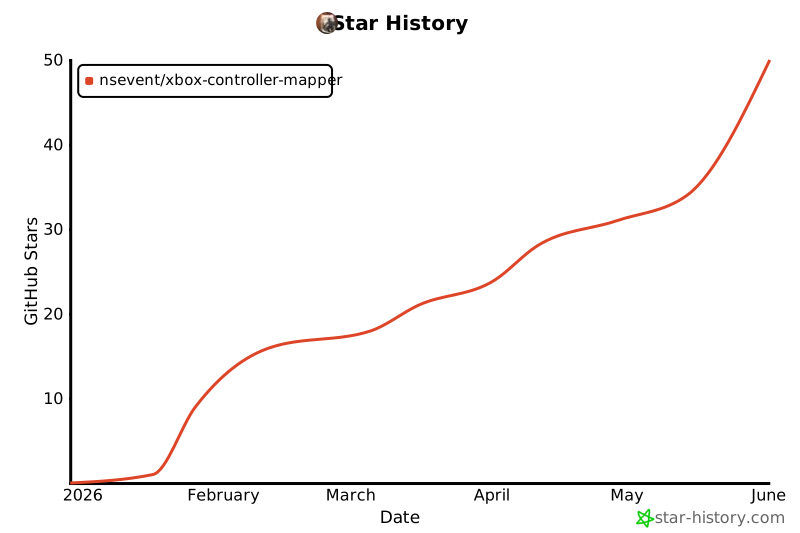](https://www.star-history.com/#NSEvent/xbox-controller-mapper&type=date&legend=top-left)