https://github.com/ucam-eo/geotessera
Python library for the Tessera embeddings
https://github.com/ucam-eo/geotessera
geospatial-data python-package
Last synced: 3 months ago
JSON representation
Python library for the Tessera embeddings
- Host: GitHub
- URL: https://github.com/ucam-eo/geotessera
- Owner: ucam-eo
- License: mit
- Created: 2025-07-02T10:24:37.000Z (12 months ago)
- Default Branch: main
- Last Pushed: 2026-04-04T06:54:05.000Z (3 months ago)
- Last Synced: 2026-04-04T08:28:25.454Z (3 months ago)
- Topics: geospatial-data, python-package
- Language: Python
- Size: 67.4 MB
- Stars: 283
- Watchers: 4
- Forks: 28
- Open Issues: 26
-
Metadata Files:
- Readme: README.md
- Changelog: CHANGES.md
- License: LICENSE.md
Awesome Lists containing this project
- open-sustainable-technology - GeoTessera - A foundation model that can process time-series satellite imagery for applications such as land classification and canopy height prediction. (Natural Resources / Soil and Land)
README
# GeoTessera
Python library for accessing and working with Tessera geospatial foundation model embeddings.
## Overview
GeoTessera provides access to geospatial embeddings from the [Tessera
foundation model](https://github.com/ucam-eo/tessera), which processes
Sentinel-1 and Sentinel-2 satellite imagery to generate 128-channel
representation maps at 10m resolution. These embeddings compress a full year of
temporal-spectral features into dense representations optimized for downstream
geospatial analysis tasks. Read more details about [the model](https://github.com/ucam-eo/tessera).

### Request missing embeddings
This repo provides **precomputed embeddings** for multiple years and regions.
Embeddings are generated by **randomly sampling tiles** within each region to ensure broad spatial coverage.
If some **years (2017–2025) / areas** are still missing for your use case, please submit an **Embedding Request**:
- 👉 **[Open an Embedding Request](../../issues/new?template=embedding-request.yml&labels=embedding-request)**
- Please include: **your organization, intended use, ROI as a bounding box with four points (lon,lat, 4 decimals), and the year(s)**.
After you submit the request, we will **prioritize your ROI** and notify you via a comment in the issue once the embeddings are ready.
### Important Notice ⚠️
On 20th August 2025, we updated the data processing pipeline of GeoTessera to resolve the issue of tiling artifacts, as shown below. We have retained the embeddings generated before August 20, as they remain effective for use in small-scale areas. After the 2024 embedding generation is completed, we will reprocess the tiles affected by tiling artifacts. If you observe such artifacts during use and they significantly impact performance, please raise the issue **[here](../../issues/new?template=embedding-request.yml&labels=embedding-request)**, and we will prioritize reprocessing your request.

Please note that if the artifacts you observe are slanted, this is not a bug in the pipeline but rather a result of the Sentinel-1/2 satellite trajectories. Currently, Tessera cannot completely eliminate such artifacts, as they reflect the inherent characteristics of the raw data. However, we have observed that they have minimal impact on downstream tasks.
## Table of Contents
- [Installation](#installation)
- [Architecture](#architecture)
- [Quick Start](#quick-start)
- [Python API](#python-api)
- [Cloud-Native Zarr Access](#cloud-native-zarr-access)
- [CLI Reference](#cli-reference)
- [Complete Workflows](#complete-workflows)
- [Registry System](#registry-system)
- [Data Organization](#data-organization)
- [Contributing](#contributing)
## Installation
Requires Python 3.12 or later.
```bash
pip install geotessera
```
For development:
```bash
git clone https://github.com/ucam-eo/geotessera
cd geotessera
pip install -e .
```
## Architecture
### Core Concepts
GeoTessera is built around a simple two-step workflow:
1. **Retrieve embeddings**: Fetch raw numpy arrays for a geographic bounding box
2. **Export to desired format**: Save as raw numpy arrays or convert to georeferenced GeoTIFF files
### Coordinate System and Tile Grid
The Tessera embeddings use a **0.1-degree grid system**:
- **Tile size**: Each tile covers 0.1° × 0.1° (approximately 11km × 11km at the equator)
- **Tile naming**: Tiles are named by their **center coordinates** (e.g., `grid_0.15_52.05`)
- **Tile bounds**: A tile at center (lon, lat) covers:
- Longitude: [lon - 0.05°, lon + 0.05°]
- Latitude: [lat - 0.05°, lat + 0.05°]
- **Resolution**: 10m per pixel (variable number of pixels per tile depending on latitude)
### File Structure and Downloads
When you request embeddings, GeoTessera downloads files directly via HTTP to temporary locations:
#### Embedding Files (via `fetch_embedding`)
1. **Quantized embeddings** (`grid_X.XX_Y.YY.npy`):
- Shape: `(height, width, 128)`
- Data type: int8 (quantized for storage efficiency)
- Contains the compressed embedding values
2. **Scale files** (`grid_X.XX_Y.YY_scales.npy`):
- Shape: `(height, width)` or `(height, width, 128)`
- Data type: float32
- Contains scale factors for dequantization
3. **Dequantization**: `final_embedding = quantized_embedding * scales`
4. **Temporary Storage**: Files are downloaded to temp locations and automatically cleaned up after processing
#### Landmask Files (for GeoTIFF export)
When exporting to GeoTIFF, additional landmask files are fetched:
- **Landmask tiles** (`grid_X.XX_Y.YY.tiff`):
- Provide UTM projection information
- Define precise geospatial transforms
- Contain land/water masks
- Also downloaded to temp locations and cleaned up after use
### Data Flow
```
User Request (lat/lon bbox)
↓
Parquet Registry Lookup (find available tiles from registry.parquet)
↓
Direct HTTP Downloads to Temp Files
├── embedding.npy (quantized) → temp file
└── embedding_scales.npy → temp file
↓
Dequantization (multiply arrays)
↓
Automatic Cleanup (delete temp files)
↓
Output Format
├── NumPy arrays → Direct analysis
└── GeoTIFF → GIS integration
```
**Storage Note**: Only the Parquet registry (~few MB) is cached locally. All embedding data is downloaded on-demand to temporary files and immediately cleaned up, resulting in zero persistent storage overhead for tile data.
## Quick Start
### Check Available Data
Before downloading, check what data is available:
```bash
# Generate a coverage map showing all available tiles
geotessera coverage --output coverage_map.png
# Generate a coverage map for the UK
geotessera coverage --country uk
# View coverage for a specific year
geotessera coverage --year 2024 --output coverage_2024.png
# Customize the visualization
geotessera coverage --year 2024 --tile-color blue --tile-alpha 0.3
```
### Download Embeddings
Download embeddings as either numpy arrays or GeoTIFF files:
```bash
# Download as GeoTIFF (default, with georeferencing)
geotessera download \
--bbox "-0.2,51.4,0.1,51.6" \
--year 2024 \
--output ./london_tiffs
# Download as raw numpy arrays (with metadata JSON)
geotessera download \
--bbox "-0.2,51.4,0.1,51.6" \
--format npy \
--year 2024 \
--output ./london_arrays
# Download using a GeoJSON/Shapefile region
geotessera download \
--region-file cambridge.geojson \
--format tiff \
--year 2024 \
--output ./cambridge_tiles
# Download specific bands only
geotessera download \
--bbox "-0.2,51.4,0.1,51.6" \
--bands "0,1,2" \
--year 2024 \
--output ./london_rgb
```
### Create Visualizations
Generate PCA visualizations and web maps from downloaded GeoTIFFs:
```bash
# Create a PCA mosaic from downloaded tiles
geotessera visualize ./london_tiffs pca_mosaic.tif
# Use histogram equalization for maximum contrast
geotessera visualize ./london_tiffs pca_balanced.tif --balance histogram
# Create web tiles and serve interactively
geotessera webmap pca_mosaic.tif --serve
# Serve existing web visualizations locally
geotessera serve ./london_web --open
```
## Python API
### Core Methods
The library provides two main methods for retrieving embeddings:
```python
from geotessera import GeoTessera
# Initialize the client
gt = GeoTessera()
# Method 1: Fetch a single tile
embedding, crs, transform = gt.fetch_embedding(lon=0.15, lat=52.05, year=2024)
print(f"Shape: {embedding.shape}") # e.g., (1200, 1200, 128)
print(f"CRS: {crs}") # Coordinate reference system from landmask
# Method 2: Fetch all tiles in a bounding box
bbox = (-0.2, 51.4, 0.1, 51.6) # (min_lon, min_lat, max_lon, max_lat)
tiles_to_fetch = gt.registry.load_blocks_for_region(bounds=bbox, year=2024)
embeddings = gt.fetch_embeddings(tiles_to_fetch)
for year, tile_lon, tile_lat, embedding_array, crs, transform in embeddings:
print(f"Tile ({tile_lat}, {tile_lon}): {embedding_array.shape}")
```
### Export Formats
#### Export as GeoTIFF
```python
# Export embeddings for a region as individual GeoTIFF files
# Step 1: Get the tiles for the region
bbox = (-0.2, 51.4, 0.1, 51.6)
tiles_to_fetch = gt.registry.load_blocks_for_region(bounds=bbox, year=2024)
# Step 2: Export those tiles as GeoTIFFs
files = gt.export_embedding_geotiffs(
tiles_to_fetch=tiles_to_fetch,
output_dir="./output",
bands=None, # Export all 128 bands (default)
compress="lzw" # Compression method
)
print(f"Created {len(files)} GeoTIFF files")
# Export specific bands only (e.g., first 3 for RGB visualization)
files = gt.export_embedding_geotiffs(
tiles_to_fetch=tiles_to_fetch,
output_dir="./rgb_output",
bands=[0, 1, 2] # Only export first 3 bands
)
```
#### Work with NumPy Arrays
```python
# Fetch and process embeddings directly
tiles_to_fetch = gt.registry.load_blocks_for_region(bounds=bbox, year=2024)
embeddings = gt.fetch_embeddings(tiles_to_fetch)
for year, tile_lon, tile_lat, embedding, crs, transform in embeddings:
# Compute statistics
mean_values = np.mean(embedding, axis=(0, 1)) # Mean per channel
std_values = np.std(embedding, axis=(0, 1)) # Std per channel
# Extract specific pixels
center_pixel = embedding[embedding.shape[0]//2, embedding.shape[1]//2, :]
# Apply custom processing
processed = your_analysis_function(embedding)
```
### Visualization Functions
```python
from geotessera.visualization import (
create_rgb_mosaic,
visualize_global_coverage
)
from geotessera.web import (
create_coverage_summary_map,
geotiff_to_web_tiles
)
# Create an RGB mosaic from multiple GeoTIFF files
create_rgb_mosaic(
geotiff_paths=["tile1.tif", "tile2.tif"],
output_path="mosaic.tif",
bands=(0, 1, 2) # RGB bands
)
# Generate web tiles for interactive maps
geotiff_to_web_tiles(
geotiff_path="mosaic.tif",
output_dir="./web_tiles",
zoom_levels=(8, 15)
)
# Create a global coverage visualization
visualize_global_coverage(
tessera_client=gt,
output_path="global_coverage.png",
year=2024, # Or None for all years
width_pixels=2000,
tile_color="red",
tile_alpha=0.6
)
```
## Cloud-Native Zarr Access
For interactive or large-scale analysis without downloading files, use the Zarr store.
This streams data directly from the cloud:
```python
from geotessera.store import GeoTesseraZarr
gt = GeoTesseraZarr()
print(gt.years) # [2017, 2018, ..., 2025]
# Sample embeddings at specific points (no download needed)
X = gt.sample_points([(-2.97, 53.44), (0.15, 52.05)], year=2025)
print(f"Shape: {X.shape}") # (2, 128)
# Read a full region as a mosaic
mosaic, transform, crs = gt.read_region(
(-3.0, 53.4, -2.9, 53.5), year=2025,
)
print(f"Mosaic shape: {mosaic.shape}")
# Work with individual UTM zones via xarray
ds = gt.open_zone(lon=0.15)
print(ds)
```
The Zarr store implements the `geoemb:` convention for geospatial embedding data
and automatically routes queries to the correct UTM zone.
## CLI Reference
### download
Download embeddings for a region in your preferred format:
```bash
geotessera download [OPTIONS]
Options:
-o, --output PATH Output directory [required]
--bbox TEXT Bounding box: 'lon,lat' (single tile) or 'min_lon,min_lat,max_lon,max_lat'
--tile TEXT Single tile by any point within it: 'lon,lat'
--region-file PATH GeoJSON/Shapefile to define region
--country TEXT Country name (e.g., 'United Kingdom', 'UK', 'GB')
-f, --format TEXT Output format: 'tiff' or 'npy' (default: tiff)
--year INT Year of embeddings (default: 2024)
--bands TEXT Comma-separated band indices (default: all 128)
--compress TEXT Compression for TIFF format (default: lzw)
--dry-run Calculate total download size without downloading
--skip-hash Skip SHA256 hash verification of downloaded files
--list-files List all created files with details
-v, --verbose Verbose output
```
**Resume behaviour**: Both TIFF and NPY downloads automatically skip files that already exist on disk, so interrupted downloads can be resumed by re-running the same command.
Single tile examples:
```bash
# Download a single tile containing a specific point
geotessera download --tile "0.17,52.23" --year 2024 -o ./single_tile
# Same result using --bbox with 2 coordinates
geotessera download --bbox "0.17,52.23" --year 2024 -o ./single_tile
```
Output formats:
- **tiff**: Georeferenced GeoTIFF files with UTM projection
- **npy**: Raw numpy arrays with metadata.json file
### visualize
Create PCA visualization from multiband GeoTIFF or NPY format embeddings:
```bash
geotessera visualize INPUT_PATH OUTPUT_FILE [OPTIONS]
Options:
--n-components INT Number of PCA components (default: 3)
--crs TEXT Target CRS for reprojection (default: EPSG:3857)
--balance TEXT RGB balance method: histogram, percentile, or adaptive
--percentile-low FLOAT Lower percentile for percentile balance (default: 2.0)
--percentile-high FLOAT Upper percentile for percentile balance (default: 98.0)
```
### webmap
Create web tiles and interactive viewer from a PCA mosaic:
```bash
geotessera webmap RGB_MOSAIC [OPTIONS]
Options:
-o, --output PATH Output directory
--min-zoom INT Min zoom for web tiles (default: 8)
--max-zoom INT Max zoom for web tiles (default: 15)
--serve/--no-serve Start web server immediately
-p, --port INT Port for web server (default: 8000)
--region-file PATH GeoJSON/Shapefile boundary to overlay
--force/--no-force Force regeneration of tiles
```
### coverage
Generate a world map showing data availability:
```bash
geotessera coverage [OPTIONS]
Options:
-o, --output PATH Output PNG file (default: tessera_coverage.png)
--year INT Specific year to visualize
--bbox TEXT Bounding box: 'lon,lat' (single tile) or 'min_lon,min_lat,max_lon,max_lat'
--tile TEXT Single tile by any point within it: 'lon,lat'
--region-file PATH GeoJSON/Shapefile to focus on specific region
--country TEXT Country name to focus on (e.g., 'United Kingdom')
--tile-color TEXT Color for tiles (default: red)
--tile-alpha FLOAT Transparency 0-1 (default: 0.6)
--tile-size FLOAT Size multiplier (default: 1.0)
--width INT Output image width in pixels (default: 2000)
--no-countries Don't show country boundaries
```
### serve
Serve web visualizations locally:
```bash
geotessera serve DIRECTORY [OPTIONS]
Options:
-p, --port INT Port number (default: 8000)
--open/--no-open Auto-open browser (default: open)
--html TEXT Specific HTML file to serve
```
### info
Display information about GeoTIFF files or the library:
```bash
geotessera info [OPTIONS]
Options:
--tiles PATH Analyze tile files/directory (GeoTIFF or NPY format)
--dataset-version TEXT Tessera dataset version
-v, --verbose Verbose output
```
## Registry System
### Overview
GeoTessera uses a Parquet-based registry system to efficiently manage and access the large Tessera dataset:
- **Single Parquet file**: All tile metadata stored in one efficient `registry.parquet` file
- **Fast queries**: Uses pandas DataFrames for efficient spatial and temporal filtering
- **Block-based organization**: Internal 5×5 degree geographic blocks for efficient queries
- **Minimal storage**: Registry file is ~few MB and cached locally
- **Integrity checking**: SHA256 checksums ensure data integrity during downloads
- Embedding files verified using `hash` column
- Scales files verified using `scales_hash` column
- Landmask files verified using landmasks registry `hash` column
- **Enabled by default** for data integrity and security
- Can be disabled with `verify_hashes=False`, `--skip-hash` CLI flag, or `GEOTESSERA_SKIP_HASH=1` environment variable
### Registry Sources
The registry can be loaded from multiple sources (in priority order):
1. **Local file** (via `--registry-path` or `registry_path` parameter)
2. **Local directory** (via `--registry-dir` or `registry_dir` parameter, looks for `registry.parquet`)
3. **Remote URL** (via `--registry-url` or `registry_url` parameter)
4. **Default remote** (from `https://dl2.geotessera.org/{version}/registry.parquet`)
```python
# Use local registry file
gt = GeoTessera(registry_path="/path/to/registry.parquet")
# Use local registry directory
gt = GeoTessera(registry_dir="/path/to/registry-dir")
# Use custom remote registry
gt = GeoTessera(registry_url="https://example.com/registry.parquet")
# Use default remote registry (downloads and caches automatically)
gt = GeoTessera() # Default behavior
```
### Registry Structure
The Parquet registry contains columns for:
- **Coordinates**: `lon`, `lat` (tile center coordinates)
- **Year**: `year` (data year, 2017-2025)
- **Hash**: `hash` (SHA256 file integrity checksum), `scales_hash` (for scale files)
- **Size**: `file_size` (file size in bytes for download planning)
```python
# Example registry query
import pandas as pd
registry = pd.read_parquet("registry.parquet")
print(registry.head())
# lon lat year hash ...
# 0.15 52.05 2024 abc123...
```
### How Registry Loading Works
1. **Load Parquet registry** → Download and cache registry file (if not local)
2. **Request tiles for bbox** → Query DataFrame for tiles in region
3. **Filter by year** → Select tiles matching requested year
4. **Find available tiles** → Return list of matching tiles
5. **Direct HTTP download** → Fetch tiles on-demand to temp files with hash verification
6. **Automatic cleanup** → Delete temp files after processing
## Data Organization
### Tessera Data Structure
```
Remote Server (https://dl2.geotessera.org)
├── v1/ # Dataset version
│ ├── registry.parquet # Parquet registry with all metadata
│ ├── 2024/ # Year
│ │ ├── grid_0.15_52.05/ # Tile (named by center coords)
│ │ │ ├── grid_0.15_52.05.npy # Quantized embeddings
│ │ │ └── grid_0.15_52.05_scales.npy # Scale factors
│ │ └── ...
│ └── landmasks/
│ ├── grid_0.15_52.05.tiff # Landmask with projection info
│ └── ...
```
### Local Cache Structure
```
~/.cache/geotessera/ # Default cache location
└── registry.parquet # Cached Parquet registry (~few MB)
# Note: Embedding and landmask tiles are NOT cached persistently.
# They are downloaded to temporary files and immediately cleaned up after use.
```
### Coordinate Reference Systems
- **Embeddings**: Stored in simple arrays, referenced by center coordinates
- **GeoTIFF exports**: Use UTM projection from corresponding landmask tiles
- **Web visualizations**: Reprojected to Web Mercator (EPSG:3857)
## Cache Configuration
GeoTessera caches only the Parquet registry file (~few MB). Embedding and landmask tiles are downloaded to temporary files and immediately cleaned up after use.
### Python API
```python
from geotessera import GeoTessera
# Use custom cache directory for registry
gt = GeoTessera(cache_dir="/path/to/cache")
# Use default cache location (recommended)
gt = GeoTessera()
```
### CLI
```bash
# Specify custom cache directory
geotessera download --cache-dir /path/to/cache ...
# Use default cache location
geotessera download ...
```
### Default Cache Locations
When `cache_dir` is not specified, the registry is cached in platform-appropriate locations:
- **Linux/macOS**: `$XDG_CACHE_HOME/geotessera` or `~/.cache/geotessera`
- **Windows**: `%LOCALAPPDATA%/geotessera`
## Hash Verification
GeoTessera verifies SHA256 checksums for all downloaded files (embeddings, scales, and landmasks) by default to ensure data integrity. You can disable this verification if needed:
### Python API
```python
from geotessera import GeoTessera
# Disable hash verification via parameter
gt = GeoTessera(verify_hashes=False)
# Or use environment variable
import os
os.environ['GEOTESSERA_SKIP_HASH'] = '1'
gt = GeoTessera()
```
### CLI
```bash
# Disable hash verification with flag
geotessera download --bbox "0,52,0.2,52.2" --year 2024 -o ./data --skip-hash
# Or use environment variable
GEOTESSERA_SKIP_HASH=1 geotessera download --bbox "0,52,0.2,52.2" --year 2024 -o ./data
```
**Note**: Hash verification is enabled by default for security. Only disable it in trusted environments or for testing purposes.
## Contributing
Contributions are welcome! Please see our [Contributing Guide](CONTRIBUTING.md) for details.
This project is licensed under the MIT License - see the [LICENSE](LICENSE.md) file for details.
## Citation
If you use Tessera in your research, please cite the [arXiv paper](https://arxiv.org/abs/2506.20380):
```bibtex
@misc{feng2025tesseratemporalembeddingssurface,
title={TESSERA: Temporal Embeddings of Surface Spectra for Earth Representation and Analysis},
author={Zhengpeng Feng and Clement Atzberger and Sadiq Jaffer and Jovana Knezevic and Silja Sormunen and Robin Young and Madeline C Lisaius and Markus Immitzer and David A. Coomes and Anil Madhavapeddy and Andrew Blake and Srinivasan Keshav},
year={2025},
eprint={2506.20380},
archivePrefix={arXiv},
primaryClass={cs.LG},
url={https://arxiv.org/abs/2506.20380},
}
```
## Links
- [Tessera Foundation Model](https://github.com/ucam-eo/tessera)
- [Tessera Interactive Notebook](https://github.com/ucam-eo/tessera-interactive-map)
- [Tessera Examples](https://github.com/ucam-eo/geotessera-examples)
- [Documentation](https://geotessera.readthedocs.io/)
- [PyPI Package](https://pypi.org/project/geotessera/)
- [Issue Tracker](https://github.com/ucam-eo/geotessera/issues)
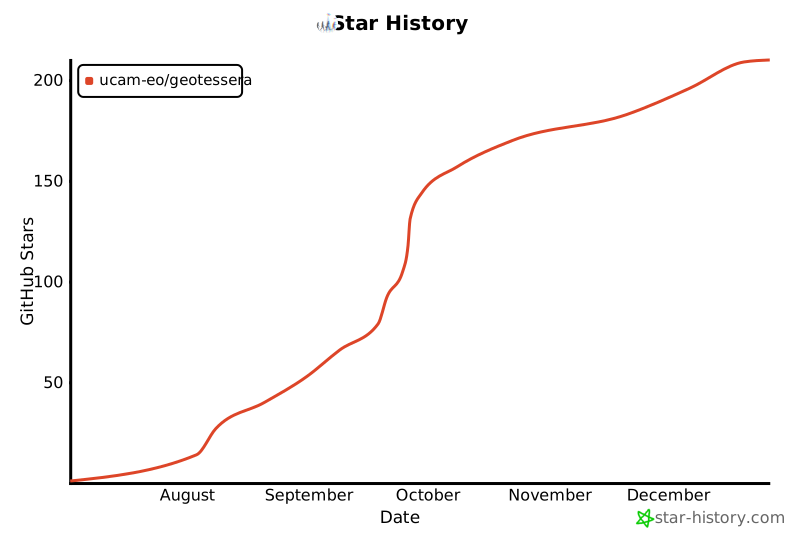
## Star History
[](https://www.star-history.com/#ucam-eo/geotessera&Date)